
Download xlCompare – compare Excel files, compare XML files, data comparison tool, Excel diff tool, XML tree comparison
Overview
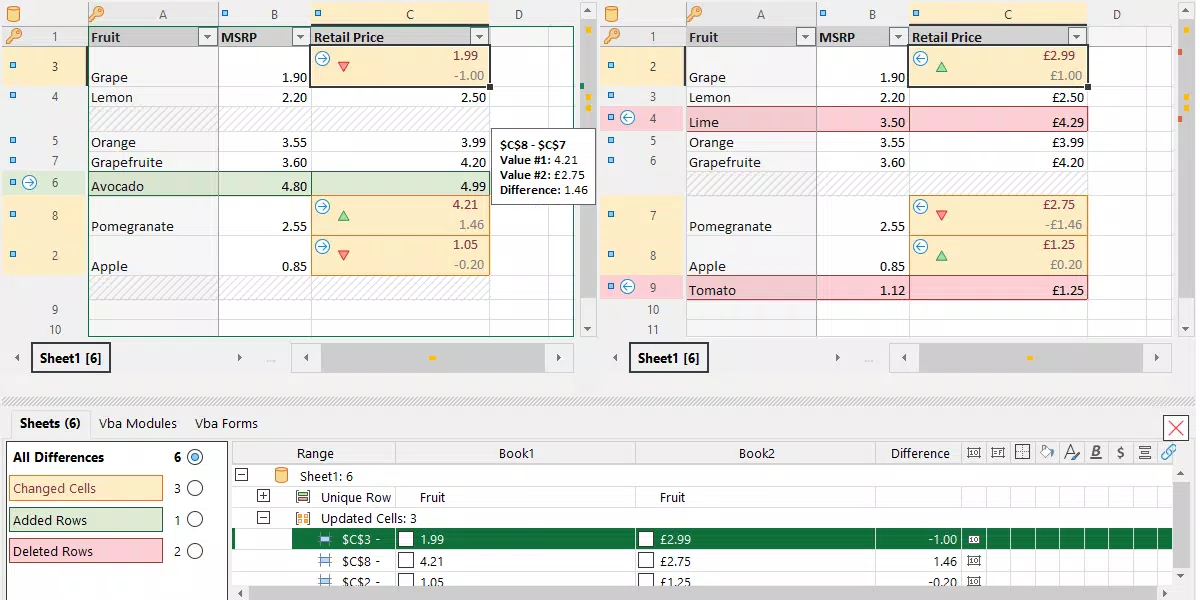
xlCompare is a specialized productivity utility tailored for professionals who regularly handle complex Excel and XML data. Designed to meet the demands of data analysts, financial experts, software developers, and system administrators, the application delivers a robust solution for identifying differences across spreadsheets and structured data files. Its primary purpose is to streamline the comparison of cell values, formulas, named ranges, and even embedded Visual Basic components in XLS, XLSX, and CSV formats. This functionality proves especially valuable during audits, data validation, or when reconciling changes across multiple versions of a workbook.
For teams using version control systems such as GIT or SVN, xlCompare integrates seamlessly into existing workflows by supporting 3-way comparisons, enabling efficient conflict resolution. The tool also extends its capabilities to XML files, offering a tree-based comparison that can ignore irrelevant differences like node order and namespaces. This makes it a versatile asset for developers working with configuration files or data interchange formats. While the evaluation version includes certain limitations, the full feature set demonstrates strong utility for users requiring precision and depth in data analysis.
The developer, xlCompare, has positioned the application as a high-performance tool for technical users. Although no additional background on the company is provided, the focus on advanced data comparison suggests a targeted development approach. Real-world use cases include reconciling financial reports, validating data imports, and debugging complex Excel models. In the broader productivity app ecosystem, xlCompare fills a niche gap by offering a dedicated, powerful alternative to generic file comparison tools.
Key Features & Functionality
- Comprehensive Comparison Engine – xlCompare detects variations in cell values, formulas, defined names, and Visual Basic components across Excel files. This level of detail ensures no discrepancy goes unnoticed, which is essential for high-stakes data integrity checks.
- Filtering and Export Capabilities – Users can filter results by matching, changed, added, or removed rows and export the findings into usable formats. This streamlines reporting and allows teams to focus only on relevant data changes.
- 3-Way Comparison Tool – Designed for collaborative environments, this feature enables the reconciliation of changes from three different versions of a file. It is particularly effective when resolving merge conflicts in version-controlled workflows.
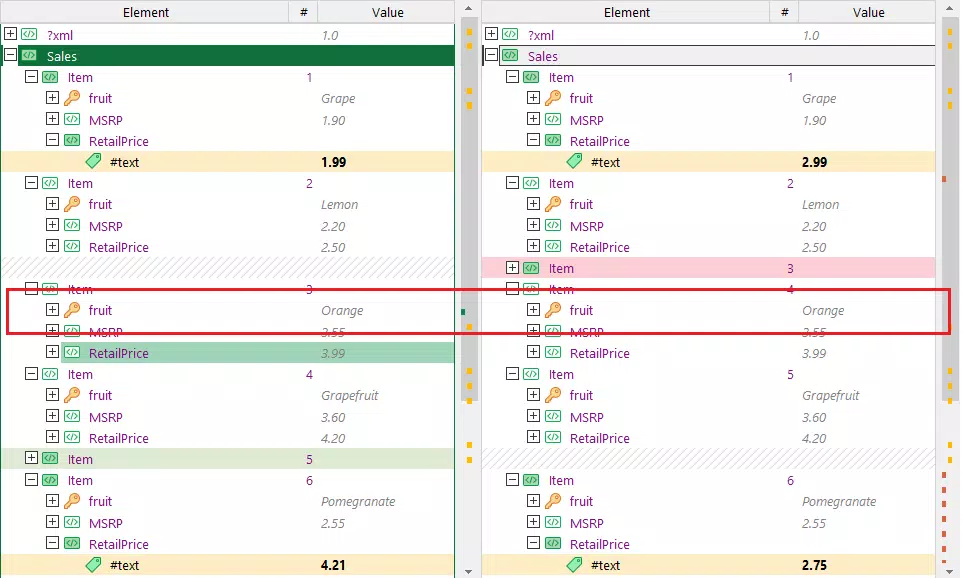
- XML Tree Comparison – The tool compares XML files as hierarchical structures, using specified key attributes to determine equivalence. It can disregard differences in node order and namespace declarations, offering flexibility in complex data environments.
- Calculation Tracing and Debugging – xlCompare allows users to trace the flow of calculations within Excel workbooks. By drilling down into sub-expressions, users can identify input sources and output destinations, aiding in the debugging of intricate models.
For example, a financial analyst can use xlCompare to compare monthly reports across departments, quickly identifying discrepancies in formulas that might affect financial forecasts. A developer integrating data from multiple sources can use the XML tree comparison to verify consistency in configuration files, ensuring system reliability. These use cases highlight how the app transforms time-consuming manual checks into efficient, automated processes.
Interface, UX & Performance
While specific UI details are not provided, xlCompare appears to be built with a functional, task-oriented interface suited for power users. The layout likely prioritizes clarity and accessibility, allowing professionals to load files, select comparison modes, and view results in a structured format. Navigation is expected to follow a logical flow: file import → configuration → comparison execution → result analysis.
Given its purpose as a data comparison utility, the application is likely optimized for responsiveness when handling large files. Although the developer did not list formal performance metrics, the tool’s ability to process complex Excel workbooks and XML structures suggests efficient memory and processing management. Stability is critical in such tools, and users can expect consistent behavior during extended sessions.
Performance across different device categories remains unspecified. However, as a Windows-based application, it is designed to run on standard desktop systems with adequate RAM and storage. The 48.4 MB file size indicates a lightweight installation, which may contribute to faster startup times and reduced system overhead. Users working with large datasets should still anticipate some delay depending on file complexity and system specifications.
Platform Compatibility & Technical Requirements
xlCompare is available for the Windows platform, making it accessible to users on desktop environments. The current software version is 1.0.2, released on March 25, 2024. The application has a file size of 48.4 MB, which is relatively compact for a feature-rich utility.
The developer did not specify minimum OS requirements or hardware recommendations. This lack of detail means users should ensure their system meets general Windows compatibility standards. No information was provided about support for older Windows versions or potential future updates. Compatibility with alternative platforms such as macOS or Linux is not confirmed.
Pros and Cons
Pros
- Highly detailed comparison of Excel and XML files, including formulas and VBA components
- Supports 3-way comparisons for efficient conflict resolution in team workflows
- Flexible XML tree comparison with options to ignore node order and namespaces
- Robust filtering and export features for focused data analysis
- Efficient for auditing, debugging, and validating complex spreadsheets
Cons
- Price point of $99.00 may be prohibitive for individual users or small teams
- Only available for Windows; no support for macOS or Linux
- Evaluation version includes limitations that may restrict full assessment
- Developer did not provide detailed system requirements or compatibility information
- Not available as a mobile app; limited to desktop use
FAQ
Is xlCompare available for mobile devices?
Currently, xlCompare is only available for Windows desktop systems. There is no mobile version for Android or iOS.
Can I use xlCompare to compare CSV files?
Yes, xlCompare supports the comparison of CSV files alongside XLS and XLSX formats.
Does xlCompare integrate with version control systems like Git?
Yes, the tool includes a 3-way comparison feature designed to work with external version control systems such as GIT and SVN.
Is the evaluation version fully functional?
The evaluation version has certain limitations. While it allows access to core comparison features, full functionality may be restricted until a license is purchased.
What file types does xlCompare support?
xlCompare supports XLS, XLSX, CSV, and XML file formats for comparison.
Final Thoughts
xlCompare stands out as a precision tool for professionals who demand accuracy in data comparison. Its ability to analyze not just cell values but also formulas, names, and embedded code makes it far more powerful than basic file diff tools. The inclusion of 3-way comparison and XML tree analysis further enhances its value in collaborative and technical environments.
While the $99.00 price tag may deter casual users, the app delivers strong value for data analysts, financial experts, and developers who frequently manage complex spreadsheets and structured data. Its lightweight footprint and robust feature set make it a reliable addition to any professional’s toolkit.
For those in need of a dedicated, high-accuracy solution for comparing Excel and XML files, xlCompare is a compelling choice. Download xlCompare now.


